Originally posted by Unknown
When trying to compile Rock versions 13 and up, I get these errors:
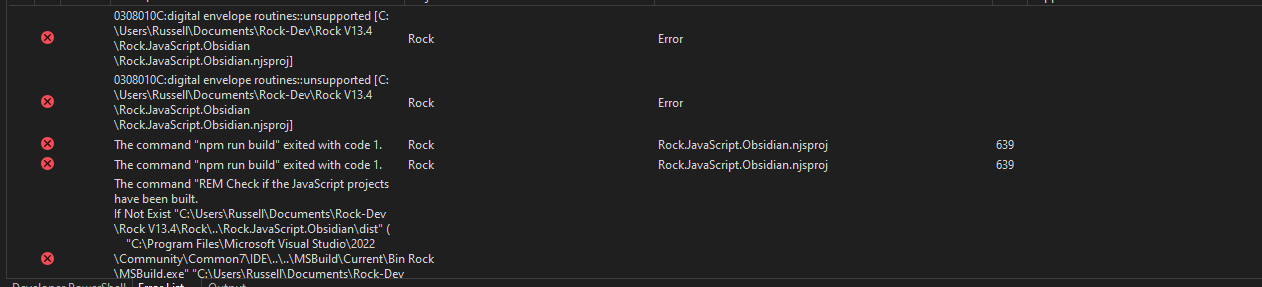
If I switch over to the Developer Powershell in Visual Studio, switch to the Rock.Javascript.Obsidian directory ( cd .\Rock.JavaScript.Obsidian\ ) and run npm run build , I get a slightly more helpful error talking about something with OpenSSL that's unsupported:
Error: error:0308010C:digital envelope routines::unsupported
    at new Hash (node:internal/crypto/hash:71:19)
    at Object.createHash (node:crypto:133:10)
    at BulkUpdateDecorator.hashFactory (C:\Users\Russell\Documents\Rock-Dev\Rock V13.7\Rock.JavaScript.Obsidian\node_modules\webpack\lib\util\createHash.js:145:18)
    at BulkUpdateDecorator.digest (C:\Users\Russell\Documents\Rock-Dev\Rock V13.7\Rock.JavaScript.Obsidian\node_modules\webpack\lib\util\createHash.js:80:21)
    at ConcatenatedModule._createIdentifier (C:\Users\Russell\Documents\Rock-Dev\Rock V13.7\Rock.JavaScript.Obsidian\node_modules\webpack\lib\optimize\ConcatenatedModule.js:1025:47)
    at ConcatenatedModule.create (C:\Users\Russell\Documents\Rock-Dev\Rock V13.7\Rock.JavaScript.Obsidian\node_modules\webpack\lib\optimize\ConcatenatedModule.js:653:41)
    at C:\Users\Russell\Documents\Rock-Dev\Rock V13.7\Rock.JavaScript.Obsidian\node_modules\webpack\lib\optimize\ModuleConcatenationPlugin.js:365:43
    at arrayEach (C:\Users\Russell\Documents\Rock-Dev\Rock V13.7\Rock.JavaScript.Obsidian\node_modules\neo-async\async.js:2405:9)
    at Object.each (C:\Users\Russell\Documents\Rock-Dev\Rock V13.7\Rock.JavaScript.Obsidian\node_modules\neo-async\async.js:2846:9)
    at C:\Users\Russell\Documents\Rock-Dev\Rock V13.7\Rock.JavaScript.Obsidian\node_modules\webpack\lib\optimize\ModuleConcatenationPlugin.js:351:15 {
  opensslErrorStack: [ 'error:03000086:digital envelope routines::initialization error' ],
  library: 'digital envelope routines',
  reason: 'unsupported',
  code: 'ERR_OSSL_EVP_UNSUPPORTED'
How do I get Rock to compile and get back to developing cool new Rock stuff?
