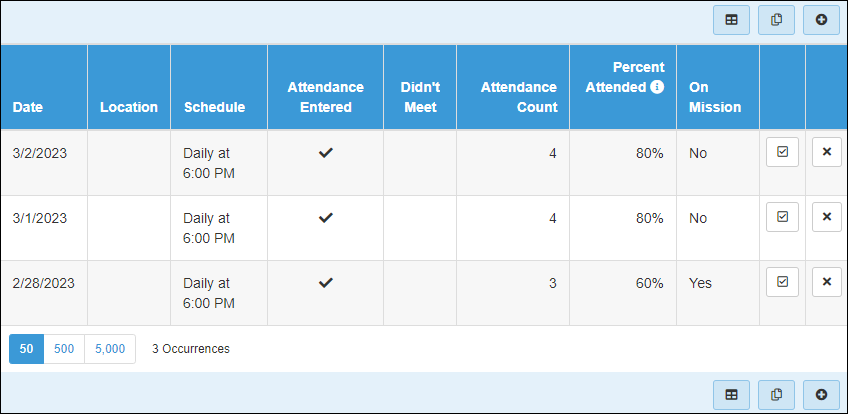
This was harder than it should of been. The underlying object types that the grid binds to don't support Lava so you can't just use Lava in the grid column setting. But it can be done. First go to General Settings > Defined Types > Lava Webhooks. Add a new value with following settings:
Value: /OccurrenceOnMission
Method: GET
Template: {% assign occId = QueryString.Id %}{% attendanceoccurrence where:'Id == {{ occId }}' %}{{ attendanceoccurrence | Attribute:'GroupOnMissionWeek' }}{% endattendanceoccurrence %}
Enabled LAVA Commands: Rock Entity
Next edit the block settings on the Attendance List block (on the page linked to in the question above). Go to Advanced Settings and add the following in the Post-HTML setting:
<script>
    Sys.Application.add_load(function () {
        $(".jsOnMission").each( function() {
            var $om = $(this);
            var occId = $om.closest('tr').attr('datakey');
            var url = '/Webhooks/Lava.ashx/OccurrenceOnMission?Id=' + occId;
            $.ajax({
                url: url,
                dataType: plain,
                success: function( data ) {
                    $om.html( data );
            });
        });
    });
</script>
Finally, edit the Custom Grid Options and add a new custom column with following settings:
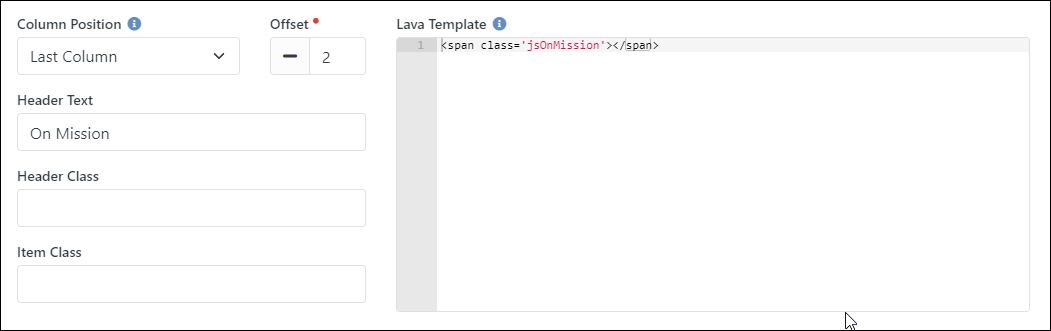
That will add a new column with just a <span> element. The script then finds all those spans, gets the occurrence ID from it's parent HTML row, and then calls the Lava webhook to get the attribute value for the occurrence. Example group: