0 votes
in Rock by TinaStephens (8.6k points)
edited

I have a registration that has class times and options and the client would like to see all the registration questions in there any way to have all those questions and answers show up on the confirmation email the registrant receives?

1 Answer

0 votes
by TinaStephens (8.6k points)
edited
 
Best answer

Yes, you need to add a new shortcode first. Sample of shortcode in demo site here:
https://demo.9embers.com/admin/cms/lava-shortcodes

  1. Go to Admin Tools > CMS Configuration > Lava Shortcodes.

  2. Add a new shortcode called "Registrant Fields",

    -make the Tag Type "Inline"

    -In the Documentation box, click code and add this html:

    <p>To display all fields for a registrant:</p><pre>{[ registrantfields id:'10' ]}</pre><p>To diplay only the 'Display in Grid' fields:</p><pre>{[ registrantfields id:'10' gridonly:'True' ]}</pre><p><br></p>

    -In the Shortcode Markup add this code:

    {% registrationregistrant id:'{{ id }}' %}
    
        {% assign registrant = registrationregistrant %}
    
        {% sql %}        
         SELECT 
             [FieldSource],
             [Key],
             [Name],
             [Value],
             [FieldTypeId]
         FROM (
             SELECT 
                 FF.[FieldSource],
                 A.[Key],
                 CASE 
                     WHEN FF.[FieldSource] = 0 THEN 
                         CASE FF.[PersonFieldType]
                             WHEN 0 THEN 'First Name'
                             WHEN 1 THEN 'Last Name'
                             WHEN 2 THEN 'Campus'
                             WHEN 3 THEN 'Address'
                             WHEN 4 THEN 'Email'
                             WHEN 5 THEN 'Birthdate'
                             WHEN 6 THEN 'Gender'
                             WHEN 7 THEN 'Marital Status'
                             WHEN 8 THEN 'Mobile Phone'
                             WHEN 9 THEN 'Home Phone'
                             WHEN 10 THEN 'Work Phone'
                             --WHEN 11 THEN 'Grade'
                             WHEN 12 THEN 'Connection Status'
                             WHEN 13 THEN 'Middle Name'
                             WHEN 14 THEN 'Anniversary Date'
                         END
                     ELSE A.[Name]
                     END AS [Name],
                 CASE    
                     WHEN FF.[FieldSource] = 0 THEN
                         CASE FF.[PersonFieldType]
                             WHEN 0 THEN P.[NickName]
                             WHEN 1 THEN P.[LastName]
                             WHEN 2 THEN C.[Name]
                             WHEN 3 THEN ( 
                                 SELECT 
                                     ISNULL([Street1], '') + ' ' + 
                                     ISNULL([Street2], '') + ' ' + 
                                     ISNULL([City], '') + ', ' + 
                                     ISNULL([State], '') + ' ' + 
                                     ISNULL([PostalCode], '') 
                                 FROM [Location] 
                                 WHERE [Id] = (
                                     SELECT TOP 1 [LocationId] 
                                     FROM [GroupLocation] 
                                     WHERE [GroupLocationTypeValueId] = 19
                                     AND [GroupId] = F.[GroupId]
                                 )
                             )
                             WHEN 4 THEN P.[Email]
                             WHEN 5 THEN CONVERT(varchar, P.[BirthDate], 1)
                             WHEN 6 THEN 
                                 CASE P.[Gender]
                                     WHEN 1 THEN 'Male'
                                     WHEN 2 THEN 'Female'
                                     ELSE ''
                                 END
                             WHEN 7 THEN MS.[Value]
                             WHEN 8 THEN (
                                     SELECT [NumberFormatted]
                                     FROM [PhoneNumber] 
                                     WHERE [PersonId] = P.[Id] 
                                     AND [NumberTypeValueId] = 12
                             )
                             WHEN 9 THEN  (
                                     SELECT [NumberFormatted]
                                     FROM [PhoneNumber] 
                                     WHERE [PersonId] = P.[Id] 
                                     AND [NumberTypeValueId] = 13
                             )
                             WHEN 10 THEN  (
                                     SELECT [NumberFormatted]
                                     FROM [PhoneNumber] 
                                     WHERE [PersonId] = P.[Id] 
                                     AND [NumberTypeValueId] = 136
                             )
                             --WHEN 11 THEN [dbo].[_rocks_pillars_GetGradeDescription](P.[GraduationYear])
                             WHEN 12 THEN CS.[Value]
                             WHEN 13 THEN P.[MiddleName]
                             WHEN 14 THEN CONVERT(varchar, P.[AnniversaryDate], 1)
                         END
                     ELSE V.[Value]
                     END AS [Value],
                 A.[FieldTypeId],
                 TF.[Order] AS [TemplateOrder],
                 FF.[Order] AS [FormOrder]
             FROM [RegistrationRegistrant] RR
             INNER JOIN [PersonAlias] PA ON PA.[Id] = RR.[PersonAliasId]
             INNER JOIN [Person] P ON P.[Id] = PA.[PersonId]
             CROSS APPLY (
                 SELECT TOP 1 
                     GM.[GroupId],
                     G.[CampusId]
                 FROM [GroupMember] gm 
                 INNER JOIN [Group] g ON g.[Id] = gm.[GroupId] 
                 WHERE [PersonId] = P.[Id]
                 AND g.[GroupTypeId] = 10 
                 ORDER BY isnull(gm.GroupOrder, 99999) 
             ) F
             INNER JOIN [Registration] R ON R.[Id] = RR.[RegistrationId]
             INNER JOIN [RegistrationInstance] I ON I.[Id] = R.[RegistrationInstanceId]
             INNER JOIN [RegistrationTemplate] T ON T.[Id] = I.[RegistrationTemplateId]
             INNER JOIN [RegistrationTemplateForm] TF ON TF.[RegistrationTemplateId] = T.[Id]
             INNER JOIN [RegistrationTemplateFormField] FF ON FF.[RegistrationTemplateFormId] = TF.[Id]
             LEFT OUTER JOIN [DefinedValue] CS ON CS.[Id] = P.[ConnectionStatusValueId]
             LEFT OUTER JOIN [DefinedValue] MS ON MS.[Id] = P.[MaritalStatusValueId]
             LEFT OUTER JOIN [Campus] C ON C.[Id] = F.[CampusId]
             LEFT OUTER JOIN [GroupMember] GM ON GM.[Id] = RR.[GroupMemberId]
             LEFT OUTER JOIN [Attribute] A ON A.[Id] = FF.[AttributeId]
             LEFT OUTER JOIN [AttributeValue] V 
                 ON V.[AttributeId] = A.[Id] 
                 AND (
                     ( FF.[FieldSource] = 1 AND V.[EntityId] = P.[Id] ) OR
                     ( FF.[FieldSource] = 2 AND V.[EntityId] = GM.[Id] ) OR
                     ( FF.[FieldSource] = 4 AND V.[EntityId] = RR.[Id] ) 
                 )
             WHERE RR.[Id] = {{ id }}
             {% if gridonly == 'True' %}
             AND FF.[IsGridField] = 1 
             {% endif %}
    
         ) T
         WHERE ISNULL(T.[Value],'') <> ''
         ORDER BY [TemplateOrder], [FormOrder]
        {% endsql %}
    
        {% for item in results %}
            {% assign key = item.Key %}
            {% assign value = item.Value %}
            {% if item.FieldSource == 1 %}
                {% assign value = registrant.PersonAlias.Person | Attribute:key %}
            {% endif %}
            {% if item.FieldSource == 2 %}
                {% assign value = registrant.GroupMember | Attribute:key %}
            {% endif %}
            {% if item.FieldSource == 4 %}
                {% assign value = registrant | Attribute:key %}
            {% endif %}
            {% if value and value != '' %}
                <strong>{{ item.Name }}</strong><br/>
                &nbsp;&nbsp;<i>{{ value }}</i><br/><br/>
            {% endif %}
        {% endfor %}  
    
    {% endregistrationregistrant %}


    -Add Parameters
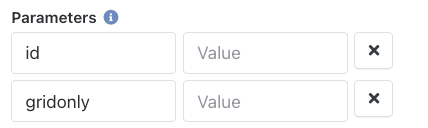
    enter image description here

-Enable Rock Entity, SQL

Now you can add the shortcode to a registration confirmation template

  1. Go to the registration template. Click Edit.

  2. Click "Show Communication Settings". Open the Confirmation Email tab.

  3. Add this shortcode {[ registrantfields id:'{{ registrant.Id }}' ]} to the confirmation email right after line 35. (the shortcode has been added to this registration template in the demo site https://demo.9embers.com/page/403?RegistrationTemplateId=3).

    enter image description here

    Now the confirmation email will include the questions and answers from the registration.

Welcome! Here you can ask questions and receive answers (hopefully) from other members of our team.
...